Today I am going to share code for sending email from outlook using your C# application. The code is quite simple and easy but you need to setup email account in outlook with proper configuration.

Sending email using outlook from your C# application is a good idea. You don’t need to store your email account credential in database / file. You don’t need to check for internet connection (outlook will send email automatically when connected to internet).
For sending email using outlook from your c# application you will need to add Microsoft.Office.Interop.Outlook reference to your project.
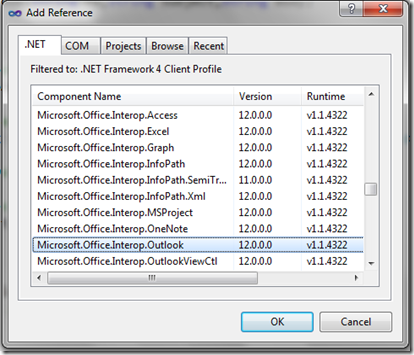
after adding this reference to project we are ready to write code for sending email.
Above code demonstrate the easiest approach to create and send email using outlook from your c# application. It creates a outlook application object, a mail message sets some properties like subject, to, body and send the email.
Using code: To send email from your application you will need to create an object of class SendMail and call SendEmail method of the class.
We can add CC and BCC:
Note: sending email using outlook from application may take long time so use the above code in background thread.
We can also send HTML email message too..
by setting body format to html we can send HTML mail from our email application.
I hope this will help someone. :)

Sending email using outlook from your C# application is a good idea. You don’t need to store your email account credential in database / file. You don’t need to check for internet connection (outlook will send email automatically when connected to internet).
For sending email using outlook from your c# application you will need to add Microsoft.Office.Interop.Outlook reference to your project.

after adding this reference to project we are ready to write code for sending email.
using System;
using System.Collections.Generic;
using System.Linq;
using System.Text;
using Outlook = Microsoft.Office.Interop.Outlook;
namespace OutlookEmailExample
{
    class SendMail
    {
        public bool SendEmail(string Subject, string To, string Body)
        {
            try
            {
                // Create the Outlook application by using inline initialization.
                Outlook.Application oApp = new Outlook.Application();

                //Create the new message by using the simplest approach.
                Outlook.MailItem oMsg = (Outlook.MailItem)oApp.CreateItem(Outlook.OlItemType.olMailItem);

                //set basic properties
                oMsg.Subject = Subject;// "This is the subject of the test message";

                oMsg.To = To;

                oMsg.Body = Body; // "This is the text in the message.";

                oMsg.Send(); // sending email


                return true;
            }
            catch (Exception ee)
            {
                throw ee;
            }
        }
    }
}
Above code demonstrate the easiest approach to create and send email using outlook from your c# application. It creates a outlook application object, a mail message sets some properties like subject, to, body and send the email.
Using code: To send email from your application you will need to create an object of class SendMail and call SendEmail method of the class.
SendMail sm = new SendMail();
sm.SendEmail("mail subject", "recipient@host.com", "mail body");
We can add CC and BCC:
oMsg.CC = "recipient1@host.com";
oMsg.BCC = "recipient2@host.com";
Note: sending email using outlook from application may take long time so use the above code in background thread.
We can also send HTML email message too..
oMsg.BodyFormat = Outlook.OlBodyFormat.olFormatHTML; //setting mail type to HTML
oMsg.HTMLBody = Body; // setting HTML body message
by setting body format to html we can send HTML mail from our email application.
I hope this will help someone. :)
